

Unity for game development is the default engine choice for mobile, indie, mid-budget PC, VR, and cross-platform projects. It ships a C# scripting stack, three render pipelines (URP, HDRP, BiRP), first-party multiplayer with Netcode for GameObjects, and export targets that cover iOS, Android, WebGL, PC, Mac, Linux, VR headsets, and current-generation consoles. Unity 6, released October 2024, added GPU Resident Drawer, Render Graph, and improved WebGPU output. For teams that want fast iteration, a deep asset ecosystem, and predictable seat-based licensing, Unity remains the pragmatic pick.
Why Unity is used for so many game projects
Unity became the default for a simple reason: it lowered the cost of shipping a game across many platforms. A single C# codebase can output to iOS, Android, WebGL, PC, Mac, Linux, PlayStation, Xbox, Nintendo Switch, Meta Quest, and Apple Vision Pro. The Editor supports rapid iteration with play-mode testing, hot reload for scripts, and a large Asset Store that gives small teams pre-built systems for input, UI, inventory, dialogue, or networking.
Unity's community footprint reinforces the choice. Learning material, Stack Overflow answers, YouTube tutorials, and open-source packages are easy to find, which shortens onboarding for new hires. For a producer scoping a game, this means Unity is usually the lower-risk engine choice unless the project has a specific reason to pick something else.
Scoping a Unity game for mobile, VR, PC, or cross-platform release?
Unity 6 and what changed in the current release
Unity 6 shipped in October 2024 as the successor to Unity 2022 LTS. The release focused on rendering throughput, web output, and mobile GPU efficiency. GPU Resident Drawer moves per-object data to the GPU, which reduces CPU cost for scenes with many draw calls. Render Graph gives URP and HDRP a unified frame-graph interface for custom passes. WebGPU support in the Web build target opens up modern browser rendering for HTML5 games. Unity 6 also folded Unity 6.1 features into the same LTS branch, so studios get a longer support window before the next major upgrade.
For live projects, Unity 6 is generally a safe upgrade from Unity 2022.3 LTS. New projects should start on Unity 6 directly.
URP vs HDRP vs BiRP: picking the render pipeline
Unity ships three render pipelines and each targets a different scope. URP (Universal Render Pipeline) is the mobile, WebGL, and cross-platform default. HDRP (High Definition Render Pipeline) targets PC and current-gen consoles with physically based lighting and volumetric effects. BiRP (Built-in Render Pipeline) is the legacy pipeline still used by older projects and some Asset Store packages.
- URP: mobile, VR, WebGL, Switch, mid-range PC. Best framerate-to-visual ratio for most Unity projects.
- HDRP: PC, PlayStation, Xbox. Higher-end visuals with real-time global illumination, volumetric fog, and screen-space effects.
- BiRP: legacy code, Asset Store packages that predate SRP, or projects that need very specific custom shaders written against the old pipeline.
The choice affects shader authoring, post-processing, and third-party asset compatibility, so it should be made at the technical setup stage of the project, not mid-production.
DOTS and ECS for data-oriented gameplay
DOTS (Data-Oriented Technology Stack) covers ECS (Entity Component System), the Burst compiler, and the Job System. Together they let Unity handle scenes with thousands of active entities, from RTS units and swarm AI to physics-heavy simulations and procedurally generated worlds. ECS separates data from behavior, Burst compiles hot paths to SIMD-friendly machine code, and Jobs distribute work across CPU cores. Games such as Cities: Skylines II and V Rising use parts of the DOTS stack in production.
DOTS is not required for a typical mobile game. It becomes useful once entity counts, physics load, or simulation complexity outgrow what standard GameObject/MonoBehaviour code can handle.
Netcode for GameObjects and the multiplayer stack
Unity ships Netcode for GameObjects as its first-party multiplayer library. It covers client-server topologies, NetworkVariables, RPCs, and integrates with Unity Gaming Services for relay, matchmaker, and lobby. For studios that need a different networking model, Mirror is the mature open-source alternative and Photon Fusion 2 is the popular commercial option with tick-based, deterministic simulation.
- Netcode for GameObjects: default first-party stack, good fit for co-op and small session PvP.
- Mirror: open-source, HLAPI-style networking with a large community.
- Photon Fusion 2: commercial, tick-based, used for competitive shooters and racing games.
- Custom server plus Netcode for Entities: for larger multiplayer projects that need authoritative simulation at scale.
Addressables and the Unity mobile pipeline
Addressables is the recommended way to load, group, and update assets on mobile and live-ops titles. It replaces Resources.Load and streams assets from local bundles or remote CDNs, which keeps the initial download small and supports content updates without a full store submission. Combined with Unity's mobile game development pipeline (IL2CPP, ARM64, Vulkan on Android, Metal on iOS), Addressables covers most of the platform-specific work that mobile releases require.
Cross-platform reach and export targets
Unity for game development covers more export targets than any other mainstream engine. A single project can build to iOS, Android, WebGL and WebGPU, Windows, macOS, Linux, PlayStation 4, PlayStation 5, Xbox One, Xbox Series X/S, Nintendo Switch, Meta Quest 2 and 3, Apple Vision Pro, PICO, and Steam Deck. Console builds require an approved developer license from the platform holder, but the codebase does not need a rewrite.
This reach is a large part of why Unity dominates hire pipelines: a team that builds an iOS game can extend it to Switch or Meta Quest without switching engines.
Unity for VR and AR: OpenXR, Quest, and Vision Pro
Unity has been the leading VR engine since the first Oculus Rift dev kits. It supports OpenXR as the standard cross-headset interface and ships direct integrations for Meta Quest, SteamVR, PICO, and Apple Vision Pro (through PolySpatial). VR templates cover XR Origin, hand tracking, interaction toolkit components, and passthrough. Beat Saber, Superhot VR, Job Simulator, and Walkabout Mini Golf were all shipped in Unity.
Cost and licensing after the Runtime Fee reversal
Unity licensing returned to a straightforward seat-based model in September 2024, when the Runtime Fee was cancelled. The current tiers are Personal (free below the revenue threshold), Plus, Pro, and Enterprise. Pro is required once studio revenue crosses the published cap and gives access to source code under NDA, priority support, and console build targets in combination with a platform license.
- Personal: free for individuals and small studios below the revenue cap.
- Plus / Pro: seat-based subscription for commercial teams.
- Enterprise: multi-seat, custom support, source access.
- No per-install runtime fee. The 2023 proposal was withdrawn.
Community, learning, and hiring pool
Unity has the largest hiring pool in game development. Unity Learn, official Unity documentation, and community platforms such as GitHub, Discord servers, and Unity Forums cover almost every gameplay problem a team will encounter. For a producer scoping a project, this translates to shorter ramp-up for new developers, easier replacement of contractors, and lower onboarding cost compared with engines that have smaller ecosystems. Teams that need to scale fast can hire Unity developers directly into an existing pipeline.
When to pick Unity vs Unreal, Godot, or Cocos
The engine choice depends on target platform, art direction, team skills, and budget. Unity for game development is a strong default for mobile, VR, cross-platform indie, and mid-budget PC. Unreal fits photoreal PC and console projects. Godot is a solid open-source pick for 2D and small 3D games. Cocos leads in HTML5 casino and casual web games.
| Criterion | Unity | Unreal | Godot | Cocos |
|---|---|---|---|---|
| Mobile fit | Very strong (URP, IL2CPP) | Workable, heavier binaries | Strong for 2D, lighter | Very strong for HTML5 / casual |
| PC / console | Strong with HDRP | Strongest for photoreal | Fine for indie PC | Limited |
| VR / AR | Leading VR engine | Strong for high-end VR | Community VR only | Not typical |
| Licensing cost | Seat-based, free tier | 5% royalty after $1M | Free, MIT license | Free, MIT-style |
| Hiring pool | Largest | Second largest | Growing | Niche, web / casino |
For most indie and mid-budget teams, Unity is the lower-risk default. Unreal makes more sense when photoreal PC or console output is the primary requirement. See the fuller breakdowns in our Unity vs Unreal and Unity vs Cocos2D comparisons.
A Game-Ace Unity portfolio case
The following project was built in Unity by Game-Ace.
Welcome to Hexagonium, a mobile MMO strategy game built in Unity by Game-Ace
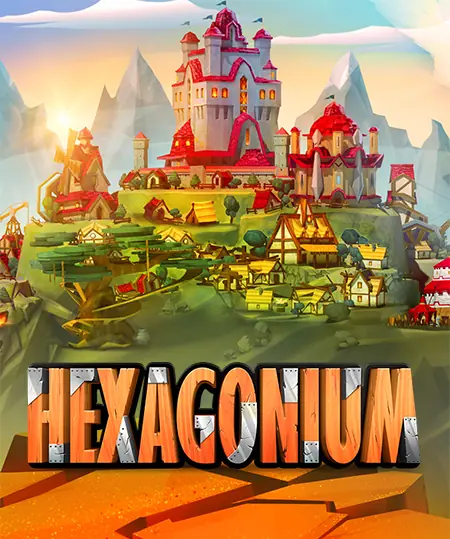
Hexagonium is a mobile MMO blending turn-based and real-time strategy, with kingdom-building, hero systems, and a persistent live economy. Game-Ace handled full-cycle Unity development, from prototype through release, including client build, server integration, and post-launch support.
When to talk to Game-Ace about Unity for game development
Game-Ace has shipped Unity projects since 2005 with a 120+ in-house team covering Unity engineering, art, QA, and live ops. If Unity is part of your roadmap, Game-Ace's custom game development studio offers full-cycle Unity delivery, co-development, and team extension under NDA with full IP transfer.
 How MetaHuman changes game character development
  Game development for startups: budget and MVP guide
  Engineering tower defense games from prototype to live service
  Idle game development: a full production guide
  Gamification in recruitment: what actually works


































